

For futures prop traders on NinjaTrader
Trade. Copy. Keep your rules. Get better.
The Loop is four tools that run inside NinjaTrader and share one set of numbers. You plan the trade, take it, copy it to every account, stay inside every firm's rules, and review it against the plan. The next day's trade starts from what you learned.
In beta now. The Loop is shared, set up and supported in the Discord.
 The Flow · you, live
01 · PLAN
Your plan
Download the day's plan and it draws itself: the zones and levels with their notes, and each scenario's trigger at its price.
More about Your plan →02 · EXECUTE
Trade Commander
The order cockpit on your chart. Every trade sized from its stop, with a target ladder and a trailing runner.
More about Trade Commander →03 · COPY
Fan-Out
Your trade on every account at the same moment, each one sized to its own balance and held inside its firm's limits.
More about Fan-Out →04 · RULES
Caddie
Every account's rules, watched live: drawdown floor, daily loss, consistency and payout readiness.
More about Caddie →05 · REVIEW
Scorecard
Your journal, rebuilt from every fill and graded against the plan you wrote down.
More about Scorecard →AT THE CENTRE · YOU
The Flow
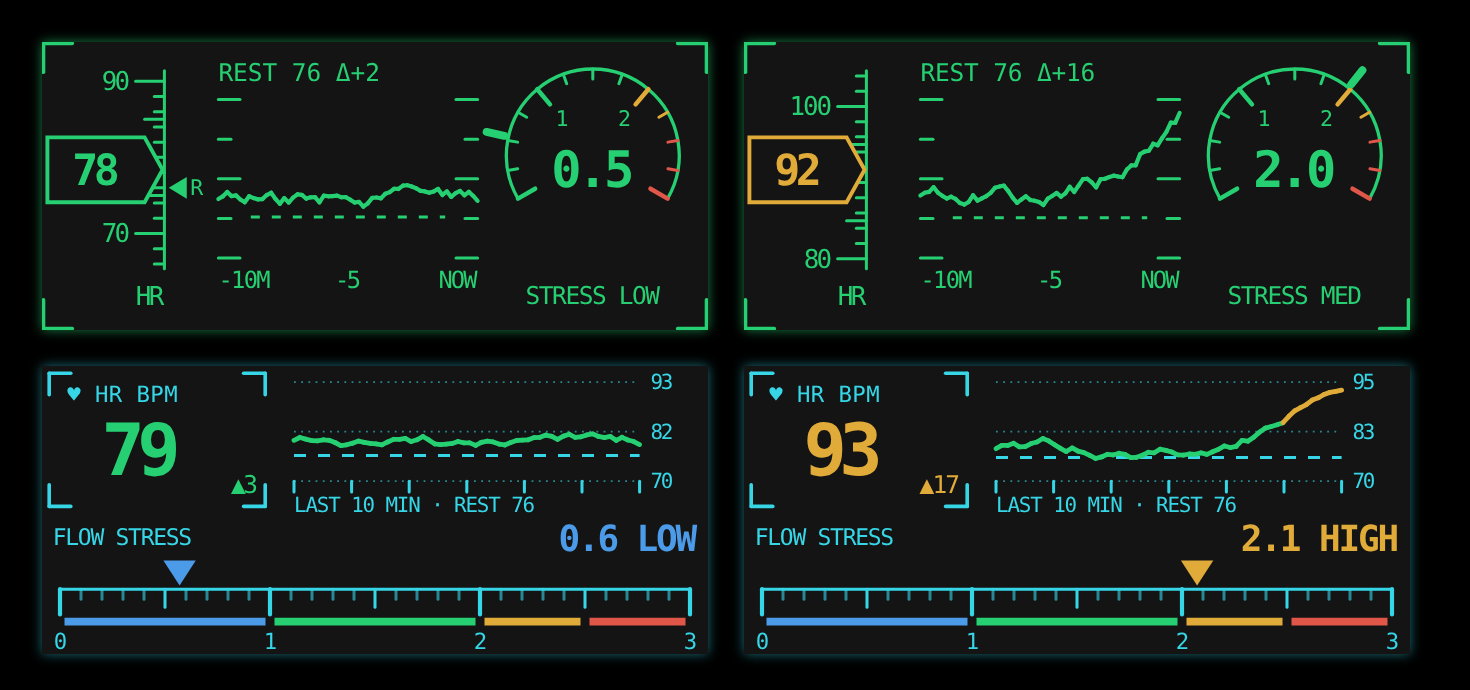
Your live heart rate and a flow-stress gauge, right beside your trading. It reads your WHOOP while you trade.
More about The Flow → Your planDownload the day's plan and it draws itself: the zones and levels with their notes, and each scenario's trigger at its price.EXECUTE02
 Trade CommanderThe order cockpit on your chart. Every trade sized from its stop, with a target ladder and a trailing runner.COPY03
 Fan-OutYour trade on every account at the same moment, each one sized to its own balance and held inside its firm's limits.RULES04
 CaddieEvery account's rules, watched live: drawdown floor, daily loss, consistency and payout readiness.REVIEW05
 ScorecardYour journal, rebuilt from every fill and graded against the plan you wrote down.
Real screens · dollar figures masked
The tools
Four tools, one panel of truth
Each one does its own job well. They also talk to each other, which is the part you can't buy from four separate vendors.
Trade Commander
The order cockpit on your chart.
- Sizes every trade from its stop, by dollars or % of the account.
- A target ladder in R, plus a runner with its own trailing stop.
- Scale out ¼ or ½ on a key. Adds re-split the bracket so the whole position stays covered.
- The day's plan on your chart, and a check of your entry against it before you send.
Fan-Out
Your trade, on every account, at the same moment.
- Runs inside NinjaTrader on your own PC, with no cloud relay in between.
- Each account is sized to its own balance and risk, on the mini or the micro.
- Every copy holds its own stop at the broker, and a MAX cap keeps it inside the firm's contract limit.
- A status light on the panel: OFF, ARMED 7, or a warning the moment a copy is missing.
Caddie
Every account's rules, watched for you.
- Drawdown floor, daily loss, consistency % and payout buffer, for every account in one panel.
- About 100 firm plans built in, or type in any firm's numbers.
- Your own daily stop, a trade limit and a cooldown after losses. Hit one and new entries stop.
- Records every fill for the Scorecard as it happens.
Scorecard
Your journal, built from every fill.
- Every trade rebuilt from your real fills, grouped by the 18:00 ET session.
- The execution gap: what you did, measured against what your plan said to do.
- Every trade graded against the day's plan: P&L on the plan vs off it, and the ideas you missed.
- Stays on your PC, with no account to create. Reads Tradovate, NinjaTrader and Sierra Chart exports too.
Why one loop
What only works when the tools talk
Put a trade manager, a copier, a risk tool and a journal from four vendors side by side, and none of them knows what the others are doing. These do.
Rules
Your rules apply to every copy
When Caddie locks an account, Trade Commander won't enter on it, and Fan-Out skips it on the next copy while the other accounts still trade.
Plan
One plan on every platform
The day's plan draws the same levels on NinjaTrader, Sierra Chart, TradingView and Tradovate.
Payouts
Payout readiness, not just drawdown
See your consistency %, how much more you need, and the withdrawal buffer. Evals say Passing, funded accounts say Payout.
Safety
Built never to leave you naked
Coverage is checked after every add and partial fill. If an entry fills just as you flatten, it's closed, not copied.
Streaming
Safe to stream
Stealth mode hides account names, and every dollar figure if you want, on both panels and in the log.
Review
Your journal knows your plan
Trade Commander checks a trade against the day's plan before you send it, and the Scorecard grades every trade against the same plan afterward, not just on whether it made money.
Claude, built in
After every session, a plain-English read of how you traded: what worked, what cost you, and one thing to do tomorrow. Every week, a review of your patterns. Any time, ask the coach about your own journal.
Included. Nothing to set up and no second bill. Your license key switches it on.
It's Claude Sonnet, made by Anthropic. See a real answer →
What happened 6 trades, all in the first hour.
What worked You waited for the level on 4 of 6.
What cost you Trade 4: a re-entry 40 seconds after a stop, and the day's biggest loss.
Tomorrow One re-entry per level, and only after a new signal.
New · The Flow
Your body, next to your trading
Your heart rate climbs after a loss before you've admitted you're tilting. The Flow puts it on Caddie's panel while you trade, and lines your WHOOP recovery and sleep up with how you traded, so you can see what a short night actually costs you.
Questions
Before you ask
Anything else, ask in the Discord.
Which platform does it run on?
NinjaTrader 8, on Windows. The daily plan levels also draw on Sierra Chart, TradingView and Tradovate, and the Scorecard reads their exports.
Does it trade for me?
No. You take every trade. Fan-Out copies your trade to your other accounts, and Caddie stops new entries when one of your rules is hit.
Which prop firms does it know?
About 100 plans are built in. For anything else, you type your firm's numbers into the account's rules and it works the same way.
Where does my trading data go?
Your fills and journal stay on your own PC. Only when you use the Claude coach does a summary of your trading go to Claude, with no account numbers in it. Privacy.
Can I stream while I trade?
Yes. Stealth mode hides account names and dollar figures on screen.
What does it cost?
It's free for testers during the beta. At launch it becomes one monthly subscription with everything included. Get it.
The Loop will make you a better trader, but it can’t fix stupid. In fact, it’ll make stupid even easier.
PJDubs
Come trade in the loop.
Get the tools, set them up with people who use them every day, and see what's next.